At some point in time, the various Linuxes out there decided that the large, blocky, easy-to-read console (as in Virtual Console, not Terminal Emulator) fonts should be replaced with tiny, hard-to-read fonts that make it a chore to edit standard 80-column scripts/source/config files in vim.
Experimenting with various grub and kernel options to change the resolution, fix i915.modeset, and so forth make for a lot of rebooting to get things just right.
Enter the Debian console-setup package. This provides a wizard that ultimately calls setfont and stty to configure the Linux Virtual Consoles.
The dialog-based wizard is invoked via sudo dpkg-reconfigure console-setup . Each screen is simple enough to navigate on its own; however, the following selections will configure the consoles to display an old, 90s-to-early-oughts style of font:
1. UTF-8 [default, just press ENTER]
2. Combined - Latin; Slavic Cyrillic; Greek [default]
3. VGA
4. 28x16
The result should produce a nice 80 column x 25 row vim display that is visible from halfway across the room (and to old geezers a few inches away). Chuck it on a Macbook air to really get some double-takes from passers by.
Showing posts with label vim. Show all posts
Showing posts with label vim. Show all posts
Tuesday, September 18, 2012
Sunday, September 18, 2011
.vimrc and UTF-8
Quick .vimrc config to display UTF-8 characters correctly:
" support UTF-8 automatically when not on console
if has('gui_running') && has('multi_byte')
set encoding=utf-8
set fileencoding=utf-8
set fileencodings=utf-8
endif
" support UTF-8 automatically when not on console
if has('gui_running') && has('multi_byte')
set encoding=utf-8
set fileencoding=utf-8
set fileencodings=utf-8
endif
Note that the gui_running requirement ensures that this will be used by gvim and by vim run from a terminal emulator (such as urxvt or mlterm), not by vim running from a virtual terminal or console.
Monday, October 18, 2010
internationalization regex
Just a quick vim regex that's useful when adding internationalization to a file:
Wraps all quoted strings in a gettext() call, preserving inner (and escaped) quotes. Doing this in vim instead of sed allows a cursory review of the changes in case any of them * shouldn't* be changed (e.g. log strings).
:%s/\("\([^\\]\\"\|[^"]\)\+"\|'\([^\\]\\'\|[^']\)\+'\)/gettext(\1)/
Wraps all quoted strings in a gettext() call, preserving inner (and escaped) quotes. Doing this in vim instead of sed allows a cursory review of the changes in case any of them * shouldn't* be changed (e.g. log strings).
Tuesday, February 3, 2009
Vim links
People either love vi or hate it; if you hate it, sod off and take your parentheses with you.
It's good to have a printout of the vi reference card handy, and a cheat sheet or two saved locally:
Vi Reference Card (PDF)
Graphical Vim Cheat Sheet (GIF)
Vim Cheat Sheet
In support of the "learn a new vim command every day" effort, both Vim Tips and the Vim Cookbook have proved interesting, as has the piping feature.
Speaking of pipes, pv is quite an interesting utility. So is histring, but it doesn't seem to be available (or maintained) except in rpm.
Vim has a ton of plugins worth checking out, including:
FuzzyFinder
OmniComplete
TagList
RenameWithCScope
C Call Tree Explorer
SourceCodeObedience
VimDebug
MiniBufferExplorer
SnippetsEmu
AllFold
Fly
SessionManager
Alternate
RunView
Scratch*
VcsCommand
MultVals
GitCommit
GitDiff
GitFile
Git Branch Info
There is also NERDTree, but its moderate utility does not justify its horrible name.
Most languages have syntax and snippet plugins, such as:
C
Python
Ruby/Rails
Perl
SQL
x86 and x86-64 asm
XML/HTML
Finally, to forestall the inevitable requests, here is a sample .vimrc .
It's good to have a printout of the vi reference card handy, and a cheat sheet or two saved locally:
Vi Reference Card (PDF)
Graphical Vim Cheat Sheet (GIF)
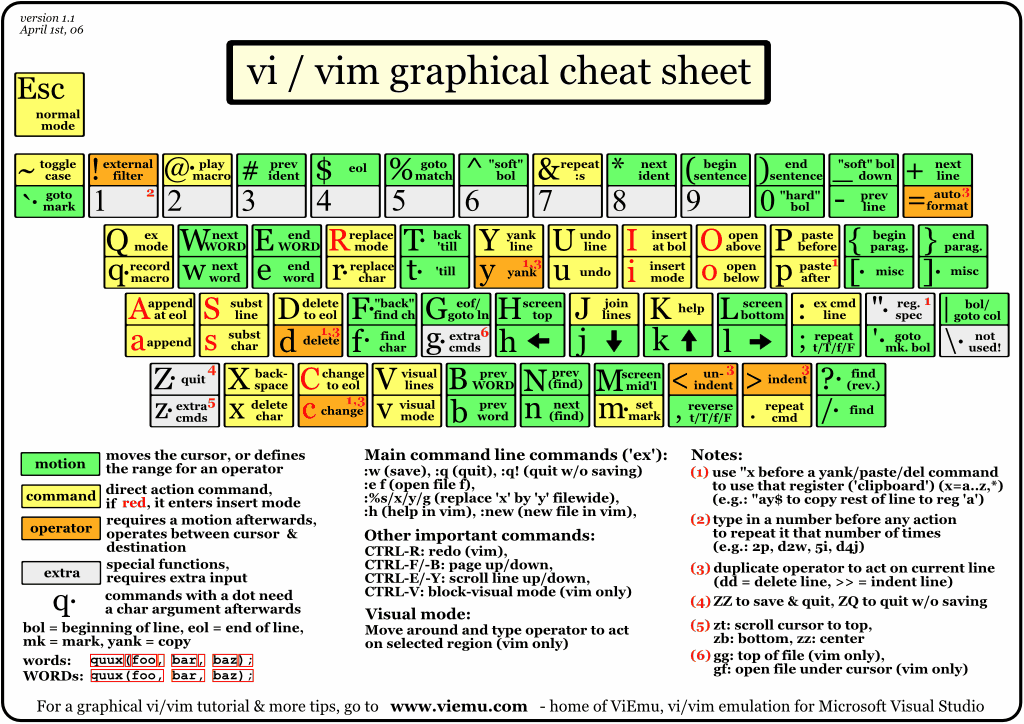
Vim Cheat Sheet
In support of the "learn a new vim command every day" effort, both Vim Tips and the Vim Cookbook have proved interesting, as has the piping feature.
Speaking of pipes, pv is quite an interesting utility. So is histring, but it doesn't seem to be available (or maintained) except in rpm.
Vim has a ton of plugins worth checking out, including:
FuzzyFinder
OmniComplete
TagList
RenameWithCScope
C Call Tree Explorer
SourceCodeObedience
VimDebug
MiniBufferExplorer
SnippetsEmu
AllFold
Fly
SessionManager
Alternate
RunView
Scratch*
VcsCommand
MultVals
GitCommit
GitDiff
GitFile
Git Branch Info
There is also NERDTree, but its moderate utility does not justify its horrible name.
Most languages have syntax and snippet plugins, such as:
C
Python
Ruby/Rails
Perl
SQL
x86 and x86-64 asm
XML/HTML
Finally, to forestall the inevitable requests, here is a sample .vimrc .
Monday, May 5, 2008
VimMate
Yet another Textmate-style extension to Vim:
http://vimmate.rubyforge.org/
This one integrates a project manager with Vim. Jury is still out on whether it will prove useful, but coupled with the Vim Debugger plugin it could prove quite useful for the dynamic languages.
http://vimmate.rubyforge.org/
This one integrates a project manager with Vim. Jury is still out on whether it will prove useful, but coupled with the Vim Debugger plugin it could prove quite useful for the dynamic languages.
Subscribe to:
Posts (Atom)