These are more for the UI folk:
Colorzilla:Look up a pixel's color value
Unicode lookup/converter : Character lookup utility
MeasureIt : Ruler widget for measuring distance in pixels
Wednesday, February 11, 2009
Tuesday, February 3, 2009
Vim links
People either love vi or hate it; if you hate it, sod off and take your parentheses with you.
It's good to have a printout of the vi reference card handy, and a cheat sheet or two saved locally:
Vi Reference Card (PDF)
Graphical Vim Cheat Sheet (GIF)
Vim Cheat Sheet
In support of the "learn a new vim command every day" effort, both Vim Tips and the Vim Cookbook have proved interesting, as has the piping feature.
Speaking of pipes, pv is quite an interesting utility. So is histring, but it doesn't seem to be available (or maintained) except in rpm.
Vim has a ton of plugins worth checking out, including:
FuzzyFinder
OmniComplete
TagList
RenameWithCScope
C Call Tree Explorer
SourceCodeObedience
VimDebug
MiniBufferExplorer
SnippetsEmu
AllFold
Fly
SessionManager
Alternate
RunView
Scratch*
VcsCommand
MultVals
GitCommit
GitDiff
GitFile
Git Branch Info
There is also NERDTree, but its moderate utility does not justify its horrible name.
Most languages have syntax and snippet plugins, such as:
C
Python
Ruby/Rails
Perl
SQL
x86 and x86-64 asm
XML/HTML
Finally, to forestall the inevitable requests, here is a sample .vimrc .
It's good to have a printout of the vi reference card handy, and a cheat sheet or two saved locally:
Vi Reference Card (PDF)
Graphical Vim Cheat Sheet (GIF)
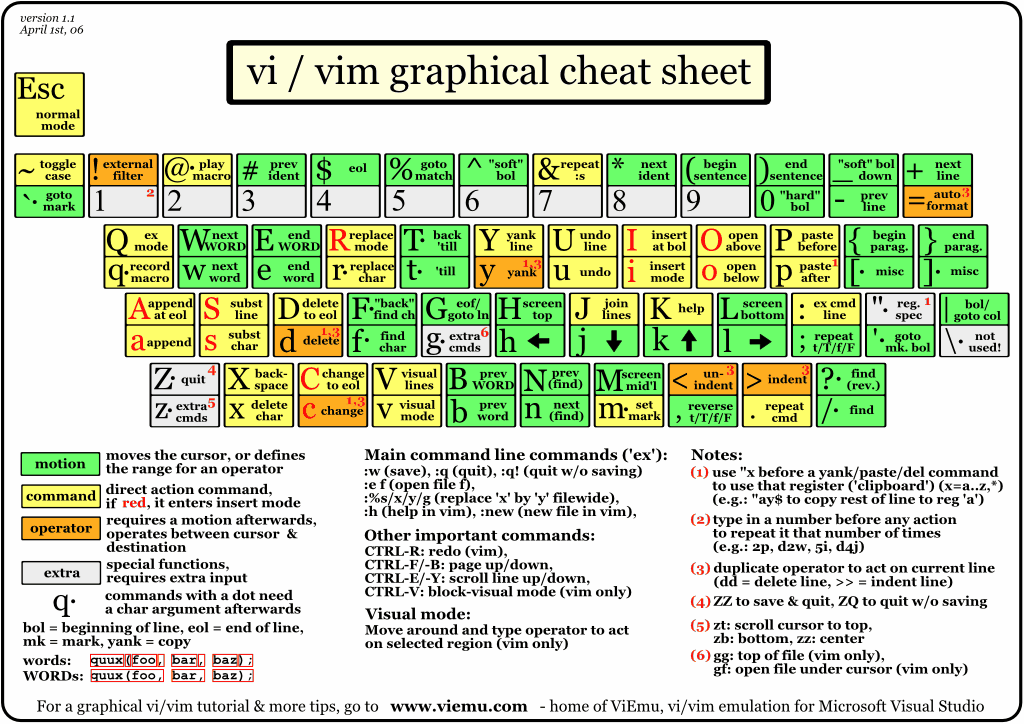
Vim Cheat Sheet
In support of the "learn a new vim command every day" effort, both Vim Tips and the Vim Cookbook have proved interesting, as has the piping feature.
Speaking of pipes, pv is quite an interesting utility. So is histring, but it doesn't seem to be available (or maintained) except in rpm.
Vim has a ton of plugins worth checking out, including:
FuzzyFinder
OmniComplete
TagList
RenameWithCScope
C Call Tree Explorer
SourceCodeObedience
VimDebug
MiniBufferExplorer
SnippetsEmu
AllFold
Fly
SessionManager
Alternate
RunView
Scratch*
VcsCommand
MultVals
GitCommit
GitDiff
GitFile
Git Branch Info
There is also NERDTree, but its moderate utility does not justify its horrible name.
Most languages have syntax and snippet plugins, such as:
C
Python
Ruby/Rails
Perl
SQL
x86 and x86-64 asm
XML/HTML
Finally, to forestall the inevitable requests, here is a sample .vimrc .
DNS
DNS timeouts have been pretty bad lately; decided to take action and make resolve.conf actually be usable. Of course, it gets overwritten every time DHCP is used to configure an interface, so the name servers have to be added to dhclient.conf .
There are quite a lot of reliable servers to choose from:
OpenDNS
TechFAQ public dns server list
dnsserverlist.org
dnsserverlist.org organized by round trip time
The last two are particularly useful: dnsserverlist.org recommends three DNS servers based on your current IP, and provides an option for sorting their list by round-trip-time.
"Permanent" DNS servers can be added by editing /etc/dhcp3/dhclient.conf and adding 'prepend domain-name-servers' lines:
prepend domain-name-servers 216.224.112.14;
prepend domain-name-servers 67.198.198.213;
prepend domain-name-servers 69.111.95.106 ;
prepend domain-name-servers 208.67.222.222;
prepend domain-name-servers 208.67.220.220;
prepend domain-name-servers 4.2.2.1;
prepend domain-name-servers 4.2.2.2;
prepend domain-name-servers 151.197.0.38;
prepend domain-name-servers 151.202.0.84;
prepend domain-name-servers 151.203.0.84;
Remember to list these in reverse-order: the last server prepended will be the first line in resolv.conf.
The ultimate solution, of course, is to set up a local caching DNS server.
There are quite a lot of reliable servers to choose from:
OpenDNS
TechFAQ public dns server list
dnsserverlist.org
dnsserverlist.org organized by round trip time
The last two are particularly useful: dnsserverlist.org recommends three DNS servers based on your current IP, and provides an option for sorting their list by round-trip-time.
"Permanent" DNS servers can be added by editing /etc/dhcp3/dhclient.conf and adding 'prepend domain-name-servers' lines:
prepend domain-name-servers 216.224.112.14;
prepend domain-name-servers 67.198.198.213;
prepend domain-name-servers 69.111.95.106 ;
prepend domain-name-servers 208.67.222.222;
prepend domain-name-servers 208.67.220.220;
prepend domain-name-servers 4.2.2.1;
prepend domain-name-servers 4.2.2.2;
prepend domain-name-servers 151.197.0.38;
prepend domain-name-servers 151.202.0.84;
prepend domain-name-servers 151.203.0.84;
Remember to list these in reverse-order: the last server prepended will be the first line in resolv.conf.
The ultimate solution, of course, is to set up a local caching DNS server.
Friday, January 30, 2009
Unfortunate words
leverage: To utilize or exploit in an unspecified, hand-wavy, and generally unplanned manner.
We leverage the core compentency of our acquisitions in this sector to maximise ROI throughout the project lifecycle.
pundit: A cheerleader in the sport of politics.
Pundits are claiming that the candidate's gaffe is an opportunity to appeal to blue-collar voters, in stark contrast to his opponent's overly intellectual demeanor.
punditry: The presentation of half-considered opinion as research- or poll-backed fact. Generally considered the province of pundits and journalists.
(See above)
blogosphere: Amateur hour in the world of publish-or-perish.
Lo, it is easier for a shark to stop swimming, than for a blogger to refrain from banal commentary.
We leverage the core compentency of our acquisitions in this sector to maximise ROI throughout the project lifecycle.
pundit: A cheerleader in the sport of politics.
Pundits are claiming that the candidate's gaffe is an opportunity to appeal to blue-collar voters, in stark contrast to his opponent's overly intellectual demeanor.
punditry: The presentation of half-considered opinion as research- or poll-backed fact. Generally considered the province of pundits and journalists.
(See above)
blogosphere: Amateur hour in the world of publish-or-perish.
Lo, it is easier for a shark to stop swimming, than for a blogger to refrain from banal commentary.
Labels:
words
Wednesday, January 28, 2009
Productive Programmer
Just tore through Neal Ford's Productive Programmer (978-0-596-51978-0), ended up with mixed feelings about it.
The first part of the book is pretty decent, with pointers to some good tools. This is also a weakness: the book is not going to be a timeless classic, and will likely be of half utility in two to five years.
The second part has good advice, but is mostly a rehash of agile methodologies. Agile has (or rather, has appropriated) a lot of good ideas, but it is ultimately a methodology, and methodologies lead to two things: zealotry and incomplete projects.
The advice given tends towards the obvious ("use the command line", "learn keyboard shortcuts", "make macros and scripts"), and UNIX is presented as something used by Other People.
In fact the book seems to assume that the reader is encumbered by the two most enfeebling technologies out there: Windows and Java. Windows is inescapable as a platform, but one always has the choice not to code like a Windows programmer (excuse me, "developer"). Java seems to be the language of choice in... well, in companies that I have no interest in working for, so nothing lost there. Buying into the Windows Way or the Java Way means you've created a lot of your own problems, and if this book helps you solve some of them, more power to you.
For the non-Windows-and/or-Java Way programmer, stick with the classics by Brooks, Hunt/Thomas, Kernighan, Plauger, Bentley, Fowler. Maybe some Beck, but you have to be careful with evangelicals.
The first part of the book is pretty decent, with pointers to some good tools. This is also a weakness: the book is not going to be a timeless classic, and will likely be of half utility in two to five years.
The second part has good advice, but is mostly a rehash of agile methodologies. Agile has (or rather, has appropriated) a lot of good ideas, but it is ultimately a methodology, and methodologies lead to two things: zealotry and incomplete projects.
The advice given tends towards the obvious ("use the command line", "learn keyboard shortcuts", "make macros and scripts"), and UNIX is presented as something used by Other People.
In fact the book seems to assume that the reader is encumbered by the two most enfeebling technologies out there: Windows and Java. Windows is inescapable as a platform, but one always has the choice not to code like a Windows programmer (excuse me, "developer"). Java seems to be the language of choice in... well, in companies that I have no interest in working for, so nothing lost there. Buying into the Windows Way or the Java Way means you've created a lot of your own problems, and if this book helps you solve some of them, more power to you.
For the non-Windows-and/or-Java Way programmer, stick with the classics by Brooks, Hunt/Thomas, Kernighan, Plauger, Bentley, Fowler. Maybe some Beck, but you have to be careful with evangelicals.
Labels:
book
Tuesday, January 27, 2009
Free as in...
Finally got sick of building custom Linux kernels just to change CONFIG_HZ from the inane default of 250 to something that makes the 10ms timer in my (proprietary) device driver work reliably (instead of firing 83 times a second). Switched to hi-resolution timers, and immediate encountered this:
FATAL: modpost: GPL-incompatible module my_module.ko uses GPL-only symbol 'hrtimer_cancel'
Turns out, after reading stuff like http://www.linuxdevices.com/articles/AT9161119242.html and http://www.linuxdevices.com/articles/AT5041108431.html, that the lunatics have taken over the asylum: specific kernel subsystems can be restricted so that only GPL modules can call them.
This is ludicrous: why should GPL code care who calls it? This has nothing to do with distribution; this is *usage*.
Not to mention entirely unlike the "free as in speech" ethos that the FSF claims to support. "Free speech" generally doesn't imply "say anything you like, just don't say it in kernel mode!".
Between this GPL nonsense and the changing of the CONFIG_HZ default value in a minor release, the Linux kernel is proving itself quite unreliable. I may have to move this entire product over to FreeBSD.
FATAL: modpost: GPL-incompatible module my_module.ko uses GPL-only symbol 'hrtimer_cancel'
Turns out, after reading stuff like http://www.linuxdevices.com/articles/AT9161119242.html and http://www.linuxdevices.com/articles/AT5041108431.html, that the lunatics have taken over the asylum: specific kernel subsystems can be restricted so that only GPL modules can call them.
This is ludicrous: why should GPL code care who calls it? This has nothing to do with distribution; this is *usage*.
Not to mention entirely unlike the "free as in speech" ethos that the FSF claims to support. "Free speech" generally doesn't imply "say anything you like, just don't say it in kernel mode!".
Between this GPL nonsense and the changing of the CONFIG_HZ default value in a minor release, the Linux kernel is proving itself quite unreliable. I may have to move this entire product over to FreeBSD.
Wednesday, June 18, 2008
Smart Search
By far the most useful plugin I've added to Firefox in the past half-year or so:
https://addons.mozilla.org/en-US/firefox/addon/188
SmartSearch adds a context menu item that allows you to send selected text (or whatever word you right-clicked on) to any one of the links in the Bookmarks 'Quick Searches' folder (Bookmarks->Organize Bookmarks->Bookmarks Menu->Quick Searches). I had to create this folder myself, because at some point I short-sightedly deleted it as being useless.
The SmartSearch page on quicksearches has a number of handy links such as a dictionary, thesaurus, IMDB, amazon, netcraft, whois, wayback archive, and google maps. I added a few more for google images and some source code pages:
Google Images Quicksearch
Google Code Quicksearch
Koders Quicksearch
Krugle Code Quicksearch (requires JS)
Codease SmartQuery
Codease FullText Query
Obviously many more can come in handy, and the code search engines can be trimmed down to just one or two (probably Koders and Codease).
The good news is that new Quicksearches are simple to create: navigate to the search page, right-click on the search form, select 'Add a keyword for this search', invent some useful keyword, and use the Quick Searches folder for the 'Create in' location.
https://addons.mozilla.org/en-US/firefox/addon/188
SmartSearch adds a context menu item that allows you to send selected text (or whatever word you right-clicked on) to any one of the links in the Bookmarks 'Quick Searches' folder (Bookmarks->Organize Bookmarks->Bookmarks Menu->Quick Searches). I had to create this folder myself, because at some point I short-sightedly deleted it as being useless.
The SmartSearch page on quicksearches has a number of handy links such as a dictionary, thesaurus, IMDB, amazon, netcraft, whois, wayback archive, and google maps. I added a few more for google images and some source code pages:
Google Images Quicksearch
Google Code Quicksearch
Koders Quicksearch
Krugle Code Quicksearch (requires JS)
Codease SmartQuery
Codease FullText Query
Obviously many more can come in handy, and the code search engines can be trimmed down to just one or two (probably Koders and Codease).
The good news is that new Quicksearches are simple to create: navigate to the search page, right-click on the search form, select 'Add a keyword for this search', invent some useful keyword, and use the Quick Searches folder for the 'Create in' location.
Labels:
firefox
Subscribe to:
Comments (Atom)